
Orange Widgets
Orange widgets are building blocks of data analysis workflows that are assembled in Orange’s visual programming environment.
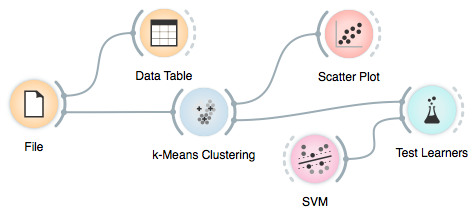
Widgets are grouped into classes according to their function. A typical workflow may mix widgets for data input and filtering, visualization, and predictive data mining.
Data
 File File |
 Paint Data Paint Data |
 Data Table Data Table |
 Select Attributes Select Attributes |
 Rank Rank |
 Purge Domain Purge Domain |
 Merge Data Merge Data |
 Concatenate Concatenate |
 Data Sampler Data Sampler |
 Select Data Select Data |
 Save Save |
 Discretize Discretize |
 Continuize Continuize |
 Impute Impute |
 Outliers Outliers |
 Edit Domain Edit Domain |
 Python Script Python Script |
Visualize
 Distributions Distributions |
 Scatter Plot Scatter Plot |
 Attribute Statistics Attribute Statistics |
 Linear Projection Linear Projection |
 Radviz Radviz |
 Polyviz Polyviz |
 Parallel Coordinates Parallel Coordinates |
 Survey Plot Survey Plot |
 Mosaic Display Mosaic Display |
 Sieve Diagram Sieve Diagram |
 Sieve Multigram Sieve Multigram |
Classify


Regression
 Mean Learner Mean Learner |
 Linear Regression Learner Linear Regression Learner |
 Regression Tree Learner Regression Tree Learner |
 Regression Tree Viewer Regression Tree Viewer |
 Pade Pade |


Associate
 Association Rules Association Rules |
 Association Rules Filter Association Rules Filter |
 Association Rules Tree Viewer Association Rules Tree Viewer |
 Item Sets Item Sets |
 Item Sets Explorer Item Sets Explorer |
Unsupervised
 Distance File Distance File |
 Save Distance File Save Distance File |
 Matrix Transformation Matrix Transformation |
 Distance Matrix Filter Distance Matrix Filter |
 Distance Map Distance Map |
 Example Distance Example Distance |
| Attribute Distance |
 Hierarchical Clustering Hierarchical Clustering |
 Interaction Graph Interaction Graph |
 K-Means Clustering K-Means Clustering |
 MDS MDS |
 Principal Component Analysis Principal Component Analysis |
 SOM SOM |
 SOM Visualizer SOM Visualizer |
Index:
- File
- Paint Data
- Data Table
- Select Attributes
- Rank
- Purge Domain
- Merge Data
- Concatenate
- Data Sampler
- Select Data
- Save
- Discretize
- Continuize
- Impute
- Outliers
- Edit Domain
- Python Script
- Distributions
- Scatter Plot
- Attribute Statistics
- Linear Projection
- Radviz
- Polyviz
- Parallel Coordinates
- Survey Plot
- Mosaic Display
- Sieve Diagram
- Naive Bayesian Learner
- SVM Learner
- Logistic Regression Learner
- Majority Learner
- Classification Tree Learner
- Classification Tree Graph
- Classification Tree Viewer
- CN2 Rule Learner
- Rule Viewer
- k-Nearest Neighbours Learner
- Nomogram
- Random Forest
- C4.5 Learner
- Interactive Tree Builder
- Mean Learner
- Linear Regression Learner
- Regression Tree Learner
- Regression Tree Viewer
- Pade
- Confusion Matrix
- ROC Analysis
- Lift Curve
- Calibration Plot
- Test Learners
- Predictions
- Association Rules
- Association Rules Filter
- Association Rules Tree Viewer
- Distance File
- Distance Map
- Example Distance
- Attribute Distance
- Hierarchical Clustering
- Interaction Graph
- K-Means Clustering
- MDS
- Principal Component Analysis